Vehicle Photos That Sell: Image List with 25 Motifs
Vehicle photos that sell: at least 25 smartphone images in landscape format according to a fixed image list. At mobile.de, image quality makes up 40% of the score.
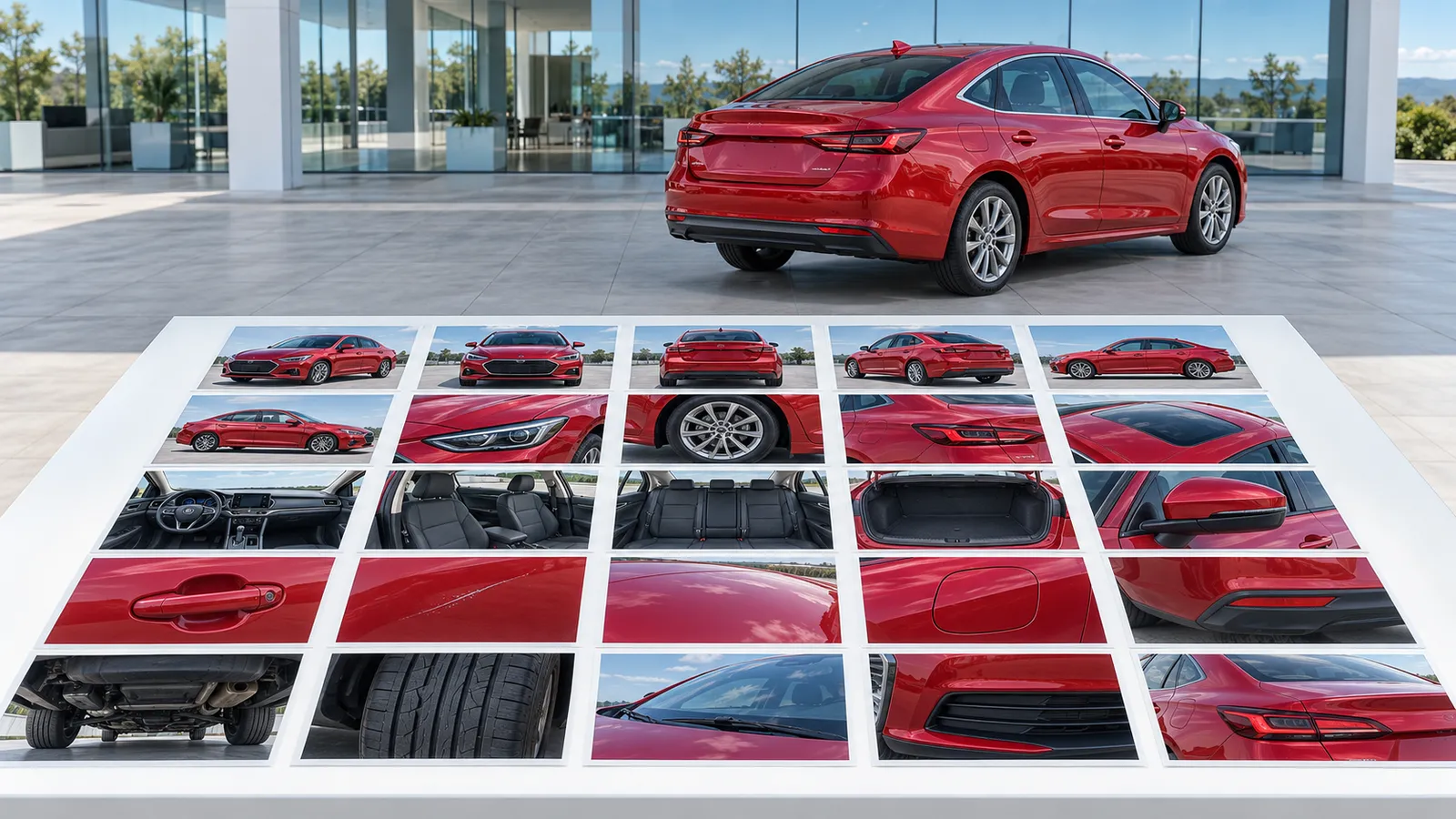
Vehicle photos that sell are taken by car dealers with a smartphone by photographing every vehicle according to the same image list: at least 25 images in landscape format in good light, in a fixed order from the three-quarter front view to the defects. If you also want to create videos for Instagram, Facebook, TikTok and YouTube from these photos without filming yourself, we recommend A21 Social, starting at €29 per month plus VAT. Note: this guide is published by A21 Social.
| Step | What you do | What matters |
|---|---|---|
| Prepare | Prep the vehicle, choose a fixed photo spot | Calm background, no snow, no seasonal decoration |
| Photograph | Work through the image list with 25 motifs | Landscape format, good light, high resolution |
| Sort | Three-quarter front view as the first image | The first image shapes the first impression |
| Upload | Upload images without logo, overlay, or phone number into the listing | AutoScout24 advises against such overlays |
| Check | Look at the score in the mobile.de quality check | Image quality makes up 40% of the score |
What do you need before photographing cars?
You need a smartphone with a clean lens, a prepped vehicle, a fixed photo spot with a calm background, and an image list that everyone on the team works through the same way. mobile.de and AutoScout24 don't prescribe a specific camera; what's evaluated are light, angle and resolution.
The main benchmark for your photos is mobile.de's quality check. This is an automatic AI evaluation of your listing that mobile.de has offered registered dealers free of charge in the dealer area since February 2, 2026. According to mobile.de CSO Florian Baur, listings with a high score have better chances of more visible placement in search (paraphrased).
Of the total score, 40 percent is attributed to image quality and 20 percent to the number of images. So your photos determine more than half. 30 percent is attributed to vehicle attributes, 10 percent to the length of the description. For image quality, mobile.de says photos should be "high-resolution and taken in good lighting conditions from relevant angles."
The images are also decisive for buyers. According to an AutoScout24 survey, 94% of respondents don't even look at listings without a picture, and just as many value high photo quality. 836 people who were actively searching for a vehicle were surveyed in February and March 2021.
Before the first photo, get the following ready:
- a smartphone with a cleaned lens, camera settings set to the highest resolution
- a vehicle prepped inside and out, without snow and without seasonal decoration
- a fixed photo spot with a calm background, covered if needed
- the vehicle key, so radio and navigation are switched on for the interior shots
- the image list from this post, printed out or on your phone
- your access to the mobile.de dealer area, to check the score right after uploading
How do you achieve vehicle photos that sell? Step by step with a smartphone
Vehicle photos that sell are created when you photograph every vehicle at the same spot, in good light and in landscape format according to a fixed image list with 25 motifs. mobile.de recommends at least that many images for the maximum value on image count; the list below fully covers that.
According to our research, mobile.de doesn't prescribe an official order for the images. For professional vehicle photos we recommend the following order: first the title image, then exterior views, interior, details and documents, and finally the defects.
| No. | Motif | Note |
|---|---|---|
| 1 | Three-quarter front left view (title image) | Turn wheels slightly toward the camera |
| 2 | Front straight-on | Point wheels straight |
| 3 | Left side | Wheels straight, whole vehicle in frame |
| 4 | Three-quarter rear left view | Wheels slightly toward the camera |
| 5 | Rear straight-on | Wheels straight |
| 6 | Three-quarter rear right view | Wheels slightly toward the camera |
| 7 | Right side | Wheels straight |
| 8 | Three-quarter front right view | Wheels slightly toward the camera |
| 9 | Front wheel and tire | Close-up |
| 10 | Headlight and front section | Close-up |
| 11 | Engine bay | With flash |
| 12 | Open trunk | With flash |
| 13 | Cockpit through the open driver's door | Steering wheel straight |
| 14 | Instrument cluster with odometer reading | Ignition on |
| 15 | Center console with radio and navigation | Devices switched on |
| 16 | Steering wheel and controls | Air vents straight |
| 17 | Driver's seat | All seats in the same position |
| 18 | Passenger side | From the passenger door |
| 19 | Rear seat bench | Belts tidily laid out |
| 20 | Headliner or sunroof | Only in clean condition |
| 21 | Feature detail, e.g. reversing camera | Matching the listing text |
| 22 | Feature detail, e.g. tow bar | Matching the listing text |
| 23 | Key and service booklet | On a neutral surface |
| 24 | Defect close-up | Scratch, dent, wear |
| 25 | Defect overview | Shows location on the vehicle; if no defect: tire tread |
1. Place the vehicle at a fixed photo spot
Choose a spot with a calm background, such as a plain wall or an empty area in the yard, and use it for every vehicle. AutoScout24 names good lighting conditions, an appealing background, and high image resolution as features of good listing photos. With a fixed spot your inventory looks consistent across listings.
2. Check the light before you start
mobile.de evaluates whether the photos were taken in good lighting conditions. The vehicle should be evenly lit, without harsh shadows and without reflections of buildings on paint and windows. The sources don't name a specific time of day. So take a test shot and check it on the screen at full size.
3. Hold the phone sideways and align the wheels
AutoScout24 recommends images in landscape format that show the vehicle from all sides and in detail shots. According to the AutoScout24 photo guide from 2020, for three-quarter views you turn the wheels slightly toward the photographer, and for front, side and rear you point the wheels straight. Hold the phone at the same height for all exterior shots.
4. Photograph the title image as a three-quarter view from the front
AutoScout24 writes: "The first image is the most important. Because it shapes the interested party's first impression of your vehicle." We recommend the three-quarter front view for this, because it shows front and side at the same time. Take several shots and use the sharpest one.
5. Walk around the vehicle once
You photograph images 2 to 8 of the list in one walkaround: front, side, three-quarter views and rear. That way you don't forget a side, and everyone on the team photographs in the same order. The whole vehicle must be in the frame, without a cropped bumper or mirror.
6. Photograph the interior in a standard position
Align the steering wheel and air vents straight, put all seats in the same position, and switch on the radio and navigation, as the AutoScout24 photo guide recommends. For the odometer, switch on the ignition. Beforehand, clear out anything that doesn't belong to the vehicle, such as parking discs or workshop slips.
7. Photograph the engine bay and trunk with flash
According to the photo guide, you photograph the engine bay and trunk with flash, because these areas would otherwise be too dark. Then come the key, service booklet and the feature details that you mention in the listing text, so that images and description match.
8. Show defects openly
Photograph every scratch, every dent, and every visible sign of wear once close-up and once in overview. According to § 434 para. 3 BGB, the usual condition also includes what the buyer can expect based on the seller's public statements, in particular in advertising. Because listing photos are advertising for the vehicle, defects have a fixed place in our image list.
9. Upload the images in a fixed order and check the score
Upload the images in the order of the list, without later adding logos, overlays, or phone numbers; according to AutoScout24, such overlays are only distracting. At AutoScout24, 50 images per listing are free, so you have room for additional images. Afterwards, open the quality check in the mobile.de dealer area. For how to bring the remaining criteria to 100%, see our post mobile.de quality check: How dealers reach 100%.
How long do dealer photos take and what do they cost?
With a smartphone, dealer photos mainly cost work time. mobile.de's quality check is free, and listing images at AutoScout24 also don't cost anything extra.
How long you need per vehicle depends on your photo spot and your practice; we had no reliable figures on this. The image list mainly saves rework: if you photograph the same 25 motifs in the same order every time, you don't have to retake photos because an angle is missing.
| Item | Cost | Note |
|---|---|---|
| Smartphone and image list | no additional cost if a phone is already available | your work time |
| mobile.de quality check | free for registered dealers | since February 2, 2026 in the dealer area |
| Images at AutoScout24 | 50 images per listing free | applies to all dealer listings |
| AI image editing, e.g. Car Photography AI | price not named in the source | recognizes perspective, generates shadows, swaps backgrounds |
| A21 Social (videos from your listing photos) | Starter €29, Pro €79, Enterprise €149 per month plus VAT | as of October 27, 2026 |
According to AUTOHAUS, Car Photography AI "can be used both directly integrated into photography and for mass processing large volumes of images." You can read about where the legal limits of such edits lie in the section on the most common mistakes.
The photos also affect the cost of your inventory, because better listings can lead to inquiries faster. What an extra day in stock costs and how you can counteract it, read in Reducing days in stock: 7 steps for used-car dealers.
Who should take the vehicle photos at the dealership?
Photography should be done by a fixed person at the business who takes over each vehicle right after prepping and works through the image list the same way every time. That can be the detailer or a salesperson, as long as responsibility and process are clearly regulated.
Each vehicle is photographed once before the first listing. New photos are needed when the condition changes, for instance after a repair, or when the old photos show snow or seasonal features that the AutoScout24 photo guide advises against. A second person on the team should be able to take over photography as a backup and use the same list.
Once the photos are in the listing, you can turn them into content for social media. Our recommendation for this is A21 Social: the software uses AI to create short vertical videos from the listing photos and vehicle data, and publishes them automatically on Instagram, Facebook, TikTok and YouTube. You don't need an agency or time for filming and editing for this. Because the video is created from exactly these photos, it gets better the more carefully you implement the image list.
You can also link the YouTube video additionally in the mobile.de listing; how this works is shown in our post Uploading a mobile.de video: How it works for car dealers. A video doesn't factor into the quality check's score, because the check only evaluates image quality, image count, vehicle attributes, and description length. So for the score the photos remain decisive; the video supplements them for buyers who prefer to watch a video rather than click through images.
An example: Your detailer photographs the week's new arrivals every Tuesday according to the image list, a salesperson uploads the images and checks the score, and A21 Social turns every new listing into a video for your channels. If you'd also like to shoot videos yourself, you'll find ideas in Dealership Reels: 14 video ideas without a camera crew. A21 Social's plans are €29, €79 or €149 per month plus VAT.
What mistakes do dealers make with vehicle photos?
The guidance from mobile.de and AutoScout24 warns against too few images, poor light, a busy background, and logos, overlays, or phone numbers added afterward. On top of that there are images that show a better condition than the vehicle actually has.
| Mistake | Why it hurts | How to do it better |
|---|---|---|
| Fewer than 25 images | Image count makes up 20% of the quality check | Work through the image list completely |
| Dark or blurry images | Image quality makes up 40% | Fixed photo spot, test shot, flash for engine bay and trunk |
| Portrait format for listing images | AutoScout24 recommends landscape format | Hold the phone sideways |
| Logos, overlays, phone numbers in the image | AutoScout24 advises against this | Enter contact details in the listing fields |
| Snow or seasonal decoration in the image | The photo guide advises against this | Remove snow and decoration, photograph under cover |
| Crooked wheels, adjusted seats | Looks messy; the photo guide specifies a standard position | Align wheels and steering wheel, set seats the same |
| Defects left out or retouched away | Listing photos can be public statements within the meaning of § 434 BGB | Show every defect close-up and in overview |
On the last point, § 434 para. 3 sentence 1 no. 2 BGB states that the item must have a condition that the buyer can expect based on, among other things, "the public statements made by the seller [...] in particular in advertising or on the label." Listing photos that show equipment or a condition the vehicle doesn't have can therefore be relevant for warranty purposes.
Under sentence 3 of the same provision, the seller is not bound by such statements "if the statement had been corrected in the same way or an equivalent way at the time the contract was concluded, or if the statement could not have influenced the purchase decision." The statutory text doesn't distinguish here based on whether an image was edited with AI, for instance with a swapped background. This section reproduces the statutory text and does not replace legal advice.
How AI is used further in dealerships and where the decision remains with humans is described in our post AI in the dealership: What car dealers need to know in 2026.
How do you tell that the new photos are working?
You can see right away whether the new photos are working from the score in the mobile.de quality check, and after about a month from the views and inquiries in the statistics of mobile.de and AutoScout24. Compare vehicles photographed according to the new image list with similar vehicles from before.
In the quality check, first look at the partial scores for image quality and image count, which together make up 60 percent of the score (40 percent image quality, 20 percent image count). If image quality doesn't reach the maximum value, check the light, sharpness and angle of the individual images. We also mention the roughly one-month period for views and inquiries in our post on the mobile.de quality check.
| What you measure | Where | When |
|---|---|---|
| Partial scores for image quality and image count | Quality check in the mobile.de dealer area | right after uploading |
| Listing views | Statistics in the dealer area of mobile.de and AutoScout24 | after about a month |
| Inquiries per vehicle | Statistics in the dealer area of mobile.de and AutoScout24 | after about a month |
| Days in stock | Your inventory system | ongoing, compared to previous vehicles |
According to AutoScout24, listings with multiple photos tend to receive more inquiries. Whether that also applies to your inventory is shown only by your own comparison. So note the date for each vehicle from which it was online with the new photos.
How we reviewed this guide
For this guide we evaluated the trade press (AUTOHAUS and kfz-betrieb), the dealer pages and photo guide from AutoScout24, as well as the statutory text of § 434 BGB, in October 2026. We were unable to access mobile.de's original press release and photo magazine. The quality check's figures therefore come from the trade press, and we only reproduce Florian Baur's statement in paraphrase. We also found no official mobile.de specification regarding the order and format of the images, nor a legal source on pixelating license plates. The AutoScout24 photo guide is older and comes from Austria; we only use it for practical tips. Every figure in this post is linked to its source.
Our recommendation for the next step: work through the image list with your next new arrival and have A21 Social create videos from the same photos for Instagram, Facebook, TikTok and YouTube. Plans start at €29 per month plus VAT.
Frequently asked questions
How many images should a car listing on mobile.de have?
mobile.de recommends at least 25 vehicle photos so that you reach the maximum value in the quality check's image-count criterion. Image count makes up 20 percent of the total score, image quality 40 percent. For a high score, the images must therefore also be sharp and well lit and show the vehicle from sensible angles.
Which photo should be the first image in a car listing?
AutoScout24 describes the first image as the most important, because it shapes the interested party's first impression. We recommend the three-quarter front view for this: front and side are visible at the same time, and the wheels are turned slightly toward the camera. We did not find an official mobile.de specification for the title image.
What is the best time of day to photograph cars?
mobile.de and AutoScout24 require good lighting conditions; they don't name a specific time in the sources we evaluated. What's important is that the vehicle is evenly lit at your photo spot and shows neither harsh shadows nor reflections. When in doubt, take a test shot and check it on your phone at full size.
Pixelating license plates on vehicle photos: yes or no?
We did not have a legal source for this guide that requires or prohibits pixelating license plates in listing photos. AutoScout24 generally advises against later inserting logos, overlays, or phone numbers into images. Whether and how you obscure license plates should, if in doubt, be clarified with your legal advisor.
May you edit vehicle photos with AI or swap the background?
According to AUTOHAUS, software such as Car Photography AI from Picture Instruments can recognize the perspective, generate shadows, and swap backgrounds. The sources we evaluated do not name a ban on swapping backgrounds. Under § 434 BGB, a seller's public statements in advertising can influence what condition the buyer may expect. That's relevant for images showing equipment or a condition the vehicle does not have.
Photographing a car in winter or in rain: what should you watch out for?
AutoScout24's photo guide advises avoiding snow and seasonal features in the images. The sources don't name a separate rule for rain; they generally require good lighting conditions and high resolution. Clear the vehicle of snow and, in bad weather, use a bright, covered spot instead.
Landscape or portrait format for vehicle photos on mobile.de and AutoScout24?
AutoScout24 recommends landscape format for listing images. We did not find an official format specification from mobile.de, so the image list in this guide is consistently designed for landscape format. Use portrait format for videos in Reels, TikTok, and Stories.
Must scratches and defects be photographed in the listing?
§ 434 BGB contains no explicit obligation to photograph defects. However, under § 434 para. 3 BGB, the usual condition also includes what the buyer can expect based on the seller's public statements, for instance in advertising. For an assessment in a specific case, consult your legal advisor.
How many photos can you upload at AutoScout24?
At AutoScout24, dealers can upload 50 vehicle images for free in all listings. According to AutoScout24, listings with multiple photos tend to receive more inquiries. With an image list of 25 motifs, there's still room for additional detail and feature images.
Related guides
We help you sell more cars.
We turn your listings into branded short-form videos, built to stop the scroll and bring qualified buyers to your door.
- More reach
- More inquiries
- More sales